
Download CapsLock Indicator – Free, Lightweight Lock Key Status Tool for Windows & Mac
Stay in control of your keyboard with CapsLock Indicator, a free, open-source, and portable utility that instantly displays the status of your Caps Lock, Num Lock, and Scroll Lock keys. Designed by indie developer Jonas Kohl, this lightweight tool is perfect for laptops and compact keyboards that lack built-in LED indicators. Whether you're typing a password, entering numbers, or navigating spreadsheets, knowing the state of your lock keys is crucial.
With CapsLock Indicator, you can check all three lock key statuses at a glance through a customizable system tray icon. The app runs silently in the background, consumes minimal resources, and requires no installation—just download, launch, and use. Ideal for both beginners and advanced users, it offers full customization, auto-start on boot, and highly configurable notifications.
Available for Windows and Mac, this secure, privacy-focused tool ensures you never mistype due to an unexpected Caps Lock activation. Download now and gain full visibility over your keyboard’s lock state.
Key Features of CapsLock Indicator
CapsLock Indicator stands out in the crowded space of keyboard utilities thanks to its clean design, powerful functionality, and user-first approach. One of its most valuable features is the real-time visual feedback for Caps Lock, Num Lock, and Scroll Lock. Unlike many keyboards that lack LED indicators—especially modern laptops—this tool ensures you're always aware of your current input state. The system tray icon changes dynamically based on the lock key status, so you can instantly tell if Caps Lock is on, even during high-pressure typing sessions.
Another standout feature is the customizable icon system. Users can choose from multiple visual styles, including color-coded indicators, simple symbols, or even custom images. You can also adjust the background, text, and border colors to match your desktop theme or personal preference. This level of personalization ensures the tool blends seamlessly into your workflow without being distracting.
For users who want more than just visual cues, CapsLock Indicator includes fully customizable notifications. You can set up alerts to trigger when a lock key state changes—perfect for avoiding accidental capitalization or number entry. These notifications can be silent, pop-up, or even play a sound, depending on your needs. The tool also supports auto-launch on system startup, so it’s always running when you need it, and your settings are preserved across sessions.
Additionally, the software is portable, meaning you can run it from a USB drive or any folder without installing it. This makes it ideal for users who switch between devices or value privacy. It’s also completely open-source, allowing developers and tech-savvy users to inspect the code, ensuring no hidden tracking or malware. With no ads, no telemetry, and no bloat, CapsLock Indicator delivers exactly what it promises: a fast, reliable, and secure way to monitor your keyboard locks.
How to Install and Use CapsLock Indicator
Installing and using CapsLock Indicator is incredibly straightforward—no technical knowledge required. The software is portable, so you don’t need to go through a traditional installation process. Simply visit the official GitHub page or trusted download site, download the latest version (available for Windows and Mac), and extract the file to your preferred folder. You can place it on your desktop, in your Documents folder, or even on a USB drive for on-the-go use.
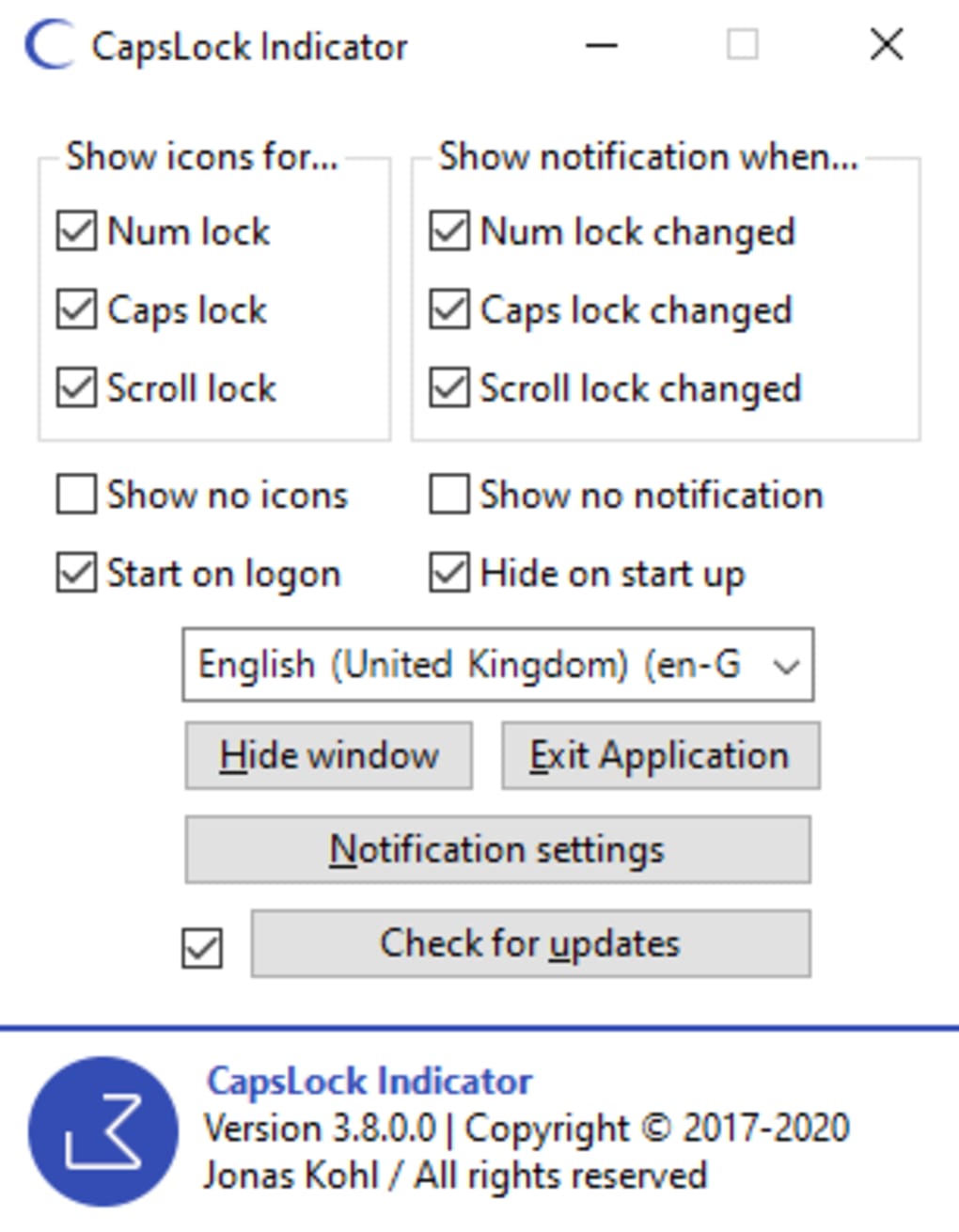
Once extracted, double-click the executable file (e.g., CapsLockIndicator.exe on Windows or CapsLockIndicator.app on Mac) to launch the application. Upon first launch, you’ll be greeted with a clean and intuitive Settings panel that lets you configure every aspect of the tool. Here, you can select which lock keys to monitor, choose your preferred icon style, and customize colors, notification types, and display duration.
After configuring your preferences, minimize the app to the system tray—located in the bottom-right corner of your screen (Windows) or top-right (Mac). From there, the icon will update in real time based on the lock key status. For example, a red icon might indicate Caps Lock is on, while a green one means it’s off. You can right-click the icon at any time to access the settings again or quickly toggle features.
To ensure the tool starts automatically with your system, enable the “Start with Windows/Mac” option in the settings. This way, you’ll never have to manually launch it after rebooting. The entire process takes less than two minutes, and once set up, the app runs silently in the background, consuming almost no CPU or memory. It’s ideal for users who want a reliable, hassle-free solution that just works.
Pros and Cons of CapsLock Indicator
Pros
- Free and open-source – No hidden costs or tracking; code is publicly available for review.
- Portable – No installation required; run from any folder or USB drive.
- Lightweight – Minimal system resource usage; runs smoothly on older or low-end devices.
- Real-time visual feedback – Instantly see the status of Caps, Num, and Scroll Lock keys.
- Highly customizable – Change icons, colors, notifications, and auto-start settings.
- Auto-launch on boot – Always active when you turn on your computer.
- Secure and private – No telemetry, ads, or data collection.
Cons
- Limited to system tray – No full-screen dashboard or advanced monitoring features.
- Basic UI – The interface is functional but not visually flashy or modern.
- Only supports Windows and Mac – No Linux or mobile versions available yet.
- Notification customization can be overwhelming for beginners.
- No built-in update checker – Users must manually check for new versions.
Frequently Asked Questions (FAQ)
- Is CapsLock Indicator free to download?
-
Yes, CapsLock Indicator is completely free to download and use. It’s also open-source, meaning you can inspect the code and even contribute to its development. There are no ads, subscriptions, or hidden fees.
- Does CapsLock Indicator work on Mac and Windows?
-
Yes, the tool is available for both Windows (7 and later) and macOS (10.12 and above). The developer ensures compatibility across major operating systems without sacrificing performance.
- Do I need to install it?
-
No, CapsLock Indicator is portable. You can run it directly from a folder or USB drive without installing anything. It doesn’t modify your registry or leave behind files after uninstallation.
- Can I customize the icons and colors?
-
Absolutely. You can choose from multiple icon styles, set custom background, text, and border colors, and even adjust how long the notification stays visible. This makes it highly adaptable to your personal setup.
- Does it use a lot of system resources?
-
No, CapsLock Indicator is designed to be lightweight. It uses minimal CPU and memory, making it ideal for older systems or devices with limited resources. It runs silently in the background without slowing down your computer.
Final Verdict: Why You Should Download CapsLock Indicator Today
CapsLock Indicator is a must-have tool for anyone who types frequently—whether you're a student, professional, programmer, or just someone who values accuracy. Its ability to provide instant, visual feedback on lock key status eliminates the frustration of accidental capitalization or unintended number entry. The fact that it’s free, open-source, portable, and secure makes it a standout choice in a sea of paid or invasive utilities.
With customizable icons, auto-launch, and detailed notifications, it’s both powerful and easy to use. While it lacks advanced features like multi-monitor support or analytics, it excels at what it does best: keeping you informed. For users who want a reliable, no-nonsense tool that just works, CapsLock Indicator delivers exceptional value.
Don’t waste time guessing whether your Caps Lock is on. Download CapsLock Indicator now and take full control of your keyboard experience—secure, fast, and completely free.







